Overview
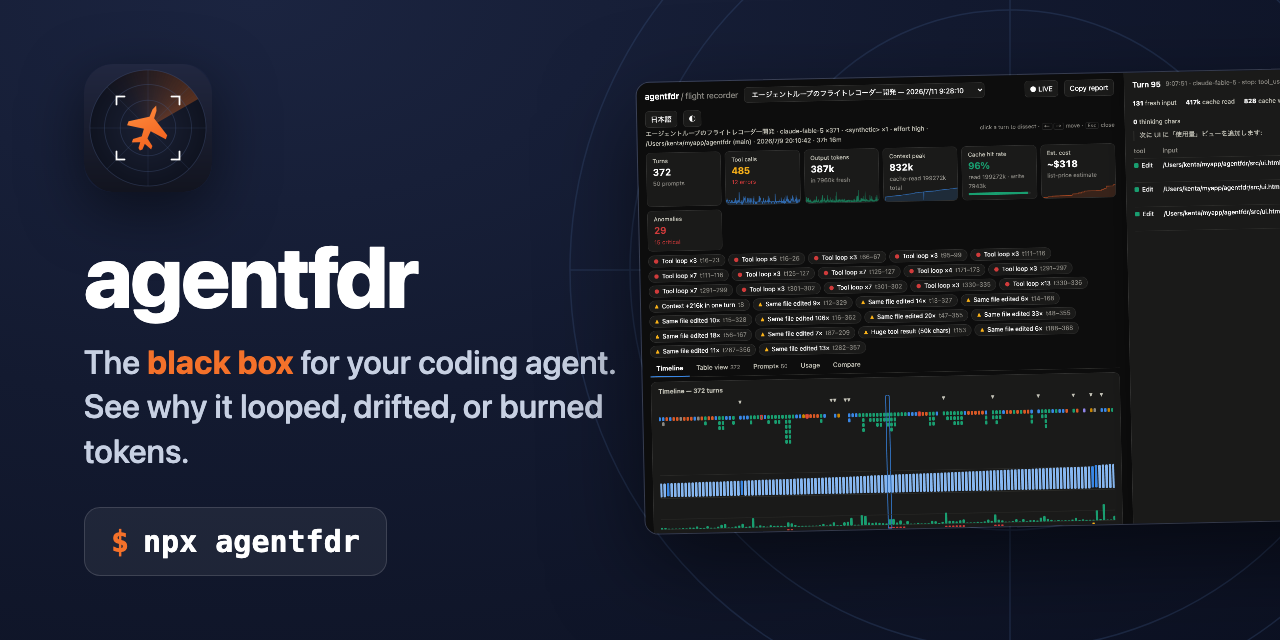
agentfdr is a debugging tool for AI agents that reveals turn-by-turn execution logs after the fact. It identifies loops, goal drift, and token waste with zero instrumentation, operating locally. Think of it as a flight recorder for autonomous agent sessions—capturing every tool call, context-window composition, and output token so you can analyze failures after they happen. It's designed to help engineers "engineer a loop you can see," turning invisible agent behavior into a inspectable timeline.
Application scenarios
Debugging infinite loops
Catch agents stuck in an "Edit → test fails → same edit" cycle that runs for 40 minutes.
Detecting goal drift
Spot when an agent asked for a bugfix instead refactored the router.
Analyzing token waste
Identify when huge tool results crowd the context window, causing cache misses and 200k token re-reads per turn.
Investigating bad landings
Understand why an agent says "Done!" with failing tests or never stops at all.
CI pipeline monitoring
Put a tripwire on autonomous pipelines with `agentfdr assert` to block loops or excessive token usage.
Cost tracking
Aggregate transcripts across projects to monitor per-model usage and estimated costs against subscription plans.
Post-mortem reporting
Generate Markdown autopsy reports ready to paste into issue trackers or Slack threads.
Core features
Timeline viewer
See the whole session on one screen—every turn's tool calls, context-window composition, output tokens, with prompt and compaction markers.
Anomaly detection
Automatically flags tool loops, error streaks, context bloat, token spikes, cache thrash, file churn, and refusals—one click from the evidence.
Turn dissection
A resizable side panel showing usage breakdown, each tool call's duration, result size, and snippet. Step through turns with ←/→ keys.
Live watch mode
`agentfdr watch` follows a session that's still running, showing context climb in real time.
CI gate
`agentfdr assert --no-loops --max-tokens 2M` exits with code 1 on violation, acting as a tripwire for autonomous pipelines.
Markdown autopsy
`agentfdr blame` renders the whole analysis as Markdown, ready to paste into an issue or Slack thread.
Usage tracking
Aggregates every project's transcripts into the same shape as subscription metering—current 5-hour window, daily history, rolling week—with per-model breakdown and estimated cost.
Budget calibration
Auto-detects your plan tier, set budgets, calibrate once against Claude Code's /usage screen, and get warning bars before hitting limits.
Target users
Software engineers and AI developers who build or maintain autonomous agent systems. Specifically, those working with agent loops, debugging unpredictable behavior, or managing token costs in production pipelines. Also useful for QA engineers setting CI gates on agent workflows, and team leads needing post-mortem reports for agent failures.
How to use
agentfdr is a command-line tool. Key commands include: ✓ agentfdr – open the newest session's timeline ✓ agentfdr list – list all recorded sessions across projects ✓ agentfdr watch – live follow a running session ✓ agentfdr blame 35cb18 – generate a Markdown autopsy for a specific issue ✓ agentfdr usage – view plan burn (5-hour window, daily, weekly) ✓ agentfdr assert --no-loops --max-tokens 2M – CI gate that exits 1 on violation No sign-up or web interface is mentioned; it operates locally via terminal commands.
Effect review
agentfdr addresses a real pain point: the invisibility of autonomous agent failures. The feature set is comprehensive for a debugging tool—covering timeline visualization, anomaly detection, live monitoring, CI integration, and cost tracking. The command-line interface suggests it's designed for developers who already work in terminal environments. While no user feedback or quality metrics are provided on the site, the tool's focus on zero-instrumentation and local operation makes it practical for production debugging without adding overhead. For teams struggling with agent loop engineering, this appears to be a focused, no-frills solution.
Frequently asked questions
What is agentfdr?
agentfdr is a debugging tool for AI agents that provides turn-by-turn execution logs after the fact, helping identify loops, goal drift, and token waste without any instrumentation.
How does agentfdr work?
It operates locally and retroactively analyzes agent execution logs to reveal each step, allowing you to see where loops or goal drift occurred without modifying your agent's code.
Do I need to instrument my agent to use agentfdr?
No, agentfdr requires zero instrumentation. It works with existing logs to provide debugging insights after execution.
What problems can agentfdr help me solve?
It helps identify infinite loops, goal drift (where the agent deviates from its intended objective), and token waste, making your AI agents more efficient and reliable.
Is agentfdr free to use?
Yes, agentfdr is an open-source tool available for free, as indicated by its GitHub repository under kamihork.
Can agentfdr be used with any AI agent framework?
Yes, since it works with execution logs after the fact, it is framework-agnostic and can be used with any AI agent that produces log output.
Launch URL
https://kamihork.github.io/agentfdr/Tags
Featured recommendations

AgentLoop
alternativeAgentLoop by the developer enables automated coding workflows: plan once in ChatGPT, then run fresh Codex workers and independent critics until your quality standards are met.

Friday AI
alternativeFriday AI is an AI agent by tryfriday.ai for product teams, enabling research, design, coding, and outreach in one desktop app.

Termi Protocol
alternativeTermi Protocol by the Termi team is a 3D simulation tool that visualizes AI agent workflows. It gives coding agents a virtual face and environment, letting you watch them read, write, and run commands

Agent A
alternativeAI marketing agent by Ahrefs, built on a dataset of 170T+ indexed pages for analyzing, building, and acting on marketing insights.
Pi Coding Agent
alternativeA terminal-based coding agent by Pi.dev for efficient command-line development, code generation, and debugging.

AgentManager
alternativeA floating macOS window by AgentManager for Claude Code sessions. It surfaces in real-time when Claude needs your input, keeping your workflow seamless and responsive.

AgentWatch
alternativeAgentWatch by jocoding.io lets you monitor Claude Code and Codex agents from your Mac, iPhone, and Apple Watch, sending instant alerts when an agent finishes or requires permission.

Telerik
alternativeTelerik by Progress is an AI observability platform for debugging and monitoring AI agent failures, reducing token waste, and shipping faster with .NET, Python, and JavaScript support.
Related Toolkits
 AI Assistant / Agents
Caffeine
Caffeine by Caffeine AI enables you to build apps and websites via chat on an open tech stack specialized for AI, removing traditional limits and accelerating development.
View Details AI Assistant / Agents
Chuangyi AI
An AI multi-agent collaborative creation platform that provides AI employee outsourcing services for short film and short drama creators, unleashing content production efficiency!
View Details AI Assistant / Agents
Dify
Dify by LangGenius enables teams to develop, deploy, and manage autonomous agents, RAG pipelines, and agentic workflows at any scale effortlessly.
View Details